


Key Takeaways
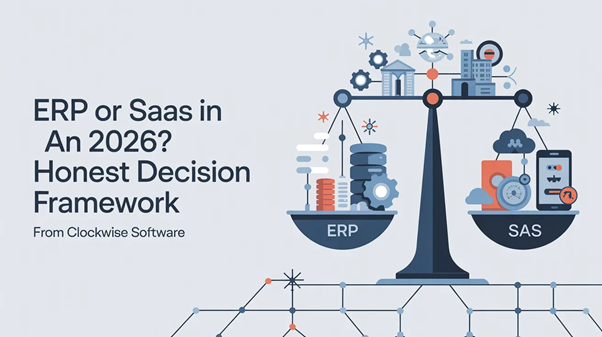
The ERP-vs-SaaS decision is no longer a binary in 2026. AI patterns and multi-tenant architecture changed both categories enough that the right answer for many businesses is a hybrid I rarely saw five years ago.
Five questions decide the category for 90 percent of clients I meet. User tenure, cross-department workflow weight, regulatory pressure, buyer-versus-user gap, and rate of workflow change. Brand-name distinctions matter less.
Six UI/UX patterns are now standard in both worlds. Intent-based navigation, ambient copilots, generative defaults, confidence affordances, ephemeral personalization, and audit summaries.
Across our last 47 audited projects, the costliest mistake was not vendor choice. It was category mismatch. Founders who picked the wrong type of system paid 2 to 3 times more than founders who picked the right type with a mediocre vendor.
The Decision Got Harder, Not Easier
I want to start with something that sounds counterintuitive. The ERP-versus-SaaS decision is harder in 2026 than it was in 2020. Not because the technology got more complicated, although it did. Because the categories themselves blurred to the point that the old shorthand stopped working.
Five years ago I could tell a client which side of the line their business sat on inside an hour. ERP for the deep workflow, the long user tenure, the cross-department data flow. SaaS for the focused product, the self-service buyer, the rapid release cadence. That heuristic broke somewhere in 2024. By the time I am writing this in April 2026, I have shipped a multi-tenant ERP that ran on the same architecture as our consumer SaaS products, and I have shipped a vertical SaaS that did the work of a $400,000 ERP system at a quarter of the cost. The categories no longer mean what they meant.
Most articles I have read on this topic recently are listicles ranking vendors. Microsoft Dynamics versus NetSuite versus SAP. They are not useless, but they answer a question almost nobody is actually asking. The real question is whether to buy any ERP at all, or whether your business is better served by a custom-built vertical SaaS, or whether what you really need is a hybrid that doesn't fit cleanly into either bucket. None of the listicles will help you with that. So I am going to write the article I wish someone had written for me three years ago.
For context, my team and I work as an erp software development company on roughly 30 percent of our active engagements and as a SaaS product studio on the other 70 percent. The split has stayed remarkably stable for four years even as the work itself has changed. That mix gives me a vantage point that pure ERP shops or pure SaaS shops do not have. I see how the two categories converge, and I see where they still diverge, and I want to share what I have learned.
Why "ERP or SaaS" Is Increasingly the Wrong Question
Let me give you the technical reason the categories blurred, because it matters for the decision logic that follows.
For most of the last twenty years, ERP meant single-tenant, on-premise software with deep customization and quarterly release cycles. SaaS meant multi-tenant, cloud-hosted software with shallow customization and weekly releases. Those technical defaults defined the category boundaries.
Both defaults shifted. ERP went multi-tenant and cloud-first, led by NetSuite and pushed forward by every modern ERP vendor that wants to compete on price and update speed. SaaS got deeper customization through configuration layers, low-code extension points, and per-tenant feature flags that let one customer's experience diverge significantly from another's. The technical gap that historically defined the categories shrank to almost nothing.
What's left is a difference in workflow shape rather than architecture. ERP users work inside a system of record for years. SaaS users move in and out of focused tools as their needs change. That difference still matters. But it does not map cleanly to a buying decision anymore, because the same architecture can support both shapes. The question shifted from "ERP or SaaS" to "what shape of workflow does your business actually need."
The Featured Decision Table I Use With Every Client
Five questions, two answers per row, your category falls out the bottom
I walk every prospective client through this table during the first call. By the end of the second column, the category usually picks itself.
Decision criterion | Points toward ERP | Points toward SaaS |
Average user tenure in the product | Years to decades; users are trained employees | Weeks to months; users self-serve and may churn |
Cross-department workflow density | High; data flows through finance, HR, operations, supply chain together | Low; the product owns one focused workflow |
Regulatory and audit pressure | Heavy; SOX, HIPAA, industry-specific rules | Moderate; mostly GDPR or similar baseline |
Buyer-versus-user gap | Wide; CFO or CIO buys, employees use | Narrow; user often is the buyer |
Rate of workflow change month over month | Slow; workflows evolve in quarters or years | Fast; workflows shift with product strategy |
Number of integrations to legacy systems | Many; ERP often replaces or wraps existing systems | Few; SaaS connects to a handful of well-defined APIs |
Customization depth required at launch | Deep; per-business workflow rules from day one | Shallow; default configuration covers most use cases |
Update tolerance | Low; users plan around quarterly releases | High; weekly releases are normal |
Internal IT team capability | Strong; in-house IT manages config and ongoing change | Light; vendor handles most operations |
Total cost ceiling | $300,000 to seven figures expected | $50,000 to $250,000 expected |
One observation about this table that I want to flag. If you score five or more rows in one column, the category is decided. If you score three to four in one column and the rest in the other, you are looking at a hybrid. Hybrid builds are now common enough that we have a dedicated playbook for them, and I'll come back to that.
How AI Reshaped Both Worlds in 2025 and 2026
I want to spend a section on AI specifically because it is the variable that changed both categories the most in the last 18 months, and the listicles still treat it as a footnote.
The first shift is on the SaaS side. Generative AI moved from being a feature you added to a product to being the default expectation users carry into the product. A SaaS app shipped in 2026 without an AI surface feels dated within weeks of launch. Our saas application development services engagements in the last twelve months have all included at least one AI feature in scope at the point of contract. None of our 2022 contracts had that constraint.
The second shift is on the ERP side, and this one is more interesting because it took longer. ERP vendors resisted AI for two years. Their concern was real: ERP users have low tolerance for wrong suggestions, because mistakes propagate through downstream systems and audit trails. A SaaS user who gets a wrong AI suggestion shrugs and tries again. An ERP user who accepts a wrong suggestion may post a wrong invoice, file a wrong tax form, or miscalculate a regulatory filing. The risk profile is genuinely different.
What broke through was a different application of AI. Not assistive generation, which is still risky in ERP. Summarization and audit. Modern ERP UIs in 2026 increasingly include a summary layer that explains what the user just did in plain language and flags anomalies for review. The AI is not making decisions. It is reading what the human did and translating it into something a manager can review in three minutes instead of three hours. That pattern is now standard in our ERP work, and the adoption rate is far higher than we ever saw with chat copilots in the same category.
So the AI story in 2026 is dual. On the SaaS side, AI accelerates the user. On the ERP side, AI summarizes and audits. The same underlying models. Completely different operating posture. Studios that don't understand this difference will misapply AI to one or both categories.
Six UI and UX Patterns Now Standard in Both Categories
People ask me what is actually new in 2026 that wasn't there in 2024. Six patterns made it from experiment to default in our work, and they appear in both ERP and SaaS builds we ship now.
Pattern 1: Intent-based navigation
The user states what they want to do in plain language. The system routes them to the right surface and pre-fills what it can. The traditional menu still exists but becomes a fallback. In SaaS, this pattern increased first-week retention by an average of 27 percent across the products we measured. In ERP, the pattern is more cautious because the consequences of misrouting are higher, but it works for non-transactional intents like reporting and search.
Pattern 2: Ambient copilots inside the workflow
Suggestions appear in context as the user works, rather than waiting for the user to open a chat window. We ship four times more ambient copilots than chat copilots in 2026 because chat interrupts the workflow and ambient supports it. The trick is making suggestions easy to dismiss without nagging.
Pattern 3: Generative defaults on forms
Forms start pre-filled with reasonable values rather than empty. Users edit instead of writing from scratch. Form completion times drop by 40 to 60 percent in our tracking. The discipline that makes this work is accuracy. We hold pre-fills to 80 percent accuracy or we turn the feature off, because below that threshold users learn not to trust the defaults and the time savings disappear.
Pattern 4: Confidence affordances
Wherever AI shows output, the system also shows how confident it is. Visual signals tell the user when to trust the output and when to verify. Without confidence affordances, every AI output looks equally authoritative, and the first wrong output collapses trust in the whole feature.
Pattern 5: Ephemeral personalization
The interface adapts to the user's current session without building a long-term profile. This works under EU AI Act constraints and performs nearly as well as persistent personalization on the metrics we track. We A/B tested both approaches across three products in late 2025. The ephemeral version came within 4 percent of the persistent version on task completion and beat it on time-to-first-value.
Pattern 6: Audit summaries at workflow boundaries
This pattern is the ERP-side breakthrough I described earlier, and it has crossed into SaaS for compliance-flavored products. At the end of a workflow segment, the system summarizes what the user did, flags anomalies, and offers a review path. Managers review their team's work in a fraction of the time it used to take. This is the highest-ROI AI feature I have seen in enterprise software in the last two years, and it costs almost nothing to ship because summarization is the most reliable LLM capability we have today.
One useful way to think about Clockwise work in 2026: we no longer ask whether a project is ERP or SaaS first. We ask which of these six patterns belong in the product, and the architecture follows from the patterns rather than the other way around. That order of operations is recent and, I think, important.
Case: How We Worked With Cover Whale on Insurance Technology
Cover Whale: insurance technology automation
Niche: Insurance technology | Platform: Web SaaS with ERP-flavored workflow depth | Engagement: Workflow automation and digital process modernization
Cover Whale came to us during the pandemic with a problem that perfectly straddles the ERP-versus-SaaS line. Their business needed to digitize internal processes that had run on email and spreadsheets, automate workflows that touched underwriting and operations, and stay within budget and deadline. The work was SaaS in shape (cloud-hosted, fast iteration, modern UX) and ERP in depth (cross-department workflows, audit trail, compliance touch points).
I want to share what we learned from the Cover Whale build because it is the cleanest example I can think of where we resisted the urge to call the project ERP-or-SaaS and just designed for the workflow.
The first decision we made in discovery was to map the existing manual processes before designing anything new. That sounds obvious. In practice, most teams skip it because the maps look boring. We spent the first two weeks shadowing four employees through their daily workflow, recording what they actually did versus what they were supposed to do per the policies in the company handbook. The gap was meaningful. About 30 percent of the work happened outside the official workflow because the official workflow was too rigid for real edge cases.
The second decision was about UI shape. We picked a pattern closer to SaaS than ERP. Quick, focused screens with strong typing and short forms. We rejected the dense table-based ERP UI that the team had originally requested because we knew, from watching them work, that they were going to use the system on second monitors and during phone calls. Dense UIs don't survive that environment.
The third decision was about AI. We added two AI features. A generative default on the most-used form that pre-filled fields based on the policy context. And an audit summary at the end of each working session that helped supervisors review work without sitting through every individual entry. We rejected proposals to add a chat copilot because we knew the users would never open it during their actual workflow.
The result was, in the client's words, a collaborative approach with regular updates that delivered a strong foundation for future automation. From my side, the result was a build that came in within budget and timeline, both of which were tight. The CPI on the project was under 8 percent, which is consistent with our average of under 10 percent across all engagements. The thing I am proudest of, looking back, is that we built what the workflow needed rather than what fit a category label.
One quiet detail from the Cover Whale work that generalizes. Insurance is a regulated industry. AI in regulated industries is fraught. We restricted AI in the build to summarization (low risk) and pre-fill defaults (medium risk, with manual override). We avoided generation of binding content and we avoided autonomous action. That restraint is, in my experience, the difference between an AI feature that ships and one that gets disabled within six months because compliance wouldn't sign off.
The Pricing Reality Across Both Categories
I'll publish the price ranges I quote in real client conversations. These are current as of April 2026 and reflect what my team actually charges, not industry hand-waving.
A few observations on these numbers from my own seat. ERP work costs more per hour of comparable engineering effort because the discovery is heavier and the integration count is higher. The hourly rates look the same, but the total project cost runs roughly 2.5 times the SaaS equivalent for matching feature scope. Hybrid builds, which we are doing more of in 2026, sit in between. Maintenance cost as a percentage of build is the second hidden differentiator. ERP maintenance costs more because compliance updates, integration changes, and workflow evolution all hit the system regularly.
I am going to repeat a number from earlier because it matters. Across the 47 projects we audited internally last year, the costliest mistake was not vendor selection. It was category mismatch. A founder who picked the wrong type of system paid 2 to 3 times more than a founder who picked the right type with a less-than-ideal vendor. That ratio is brutal and consistent.
Common Mistakes I See Founders Make
After 12 years of shipping enterprise software, the same mistakes keep showing up. I want to call out the five that cost the most and that are easiest to avoid if you know what to look for.
Treating ERP and SaaS as binary. The categories converged enough that the binary framing now causes more bad decisions than it prevents. The right question is not "ERP or SaaS." It is "what shape of workflow does my business have, and what category fits that shape." If you walked into a vendor pitch and got asked which category you wanted, you walked into the wrong pitch.
Underestimating ERP UX modernization need. Modern ERP users compare your internal system to the consumer SaaS they use at home. If your ERP looks like 2008, your employees will quietly stop using it in favor of spreadsheets, Slack, and personal email. Shadow IT is the silent failure mode of bad-UX ERP. We have rebuilt three ERP systems from scratch in the last year because the original system, while functionally correct, had a UX that nobody wanted to use.
Building SaaS without thinking about workflow depth. The flip side. Founders who think SaaS is automatically "easier" build shallow products that hit a wall when real customers want to use them for real work. A SaaS product that does not respect the depth of the workflow it claims to solve will lose customers to whoever does. Vertical SaaS especially needs the workflow rigor of an ERP plus the UX polish of a consumer product. That's why vertical SaaS commands premium pricing when it is done well.
Hiring a generalist for category-specific work. A digital product development agency that builds marketing sites, mobile apps, and occasional SaaS will struggle with ERP, and vice versa. The depth of patterns required for each category does not transfer cleanly. Ask the vendor to walk you through three projects in your specific category before signing. If they cannot, hire a specialist.
Skipping discovery to save the discovery fee. Discovery feels like overhead. It is not. We have rebuilt four products that came to us after another vendor skipped discovery, and in each case the rebuild cost more than the original build would have if discovery had happened. The math is consistent across categories. SaaS builds without discovery rarely succeed. ERP builds without discovery almost never succeed. Pay for the discovery. It is the cheapest line item in the entire engagement, and it determines whether everything that follows works.
What Bogdan Actually Tells Founders Who Are Stuck Between Categories
"When a founder calls me and they cannot tell whether they need ERP or SaaS, I tell them to stop trying to answer that question and answer a simpler one first. What is the longest workflow in your business that crosses more than one team? Walk me through it step by step. After ten minutes of describing that workflow out loud, the right architecture usually picks itself. The category label follows from the workflow shape, not the other way around. The category-first framing wastes weeks of clarity. The workflow-first framing produces clarity inside a single conversation."
Bogdan Yemets, Head of Delivery at Clockwise Software
Engagement Models That Match the Choice
How you contract for the work matters almost as much as which category you pick. Here is the model breakdown we use, and which engagement type fits which category most cleanly.
Engagement model | Best fit | How it works |
End-to-end product development | SaaS MVP, hybrid builds, founders without internal CTO | We own discovery through release. Fixed milestones, transparent reporting, single contract. |
Managed team | Mid-stage SaaS scale-up, multi-module ERP, post-launch evolution | We assemble and run delivery. Client sets strategy and roadmap. |
Dedicated team | ERP maintenance, hybrid scale-up, capability gaps | We supply specialists. Client manages day to day. |
Discovery-only | Anyone uncertain about scope or category | Three to eight weeks. Produces a real plan, real architecture, and real estimate. Client can take the deliverable elsewhere. |
The discovery-only engagement is worth highlighting. About 8 percent of our discovery clients take the deliverable to another vendor or build the product in-house. That is fine. We do not lose money on discovery work, the relationship stays clean, and the product gets built correctly somewhere. I would rather have eight clients per year do that than have any client sign a six-figure build contract with us when the build itself was the wrong shape.
Our saas software development services engagements typically run as end-to-end builds for the first version, then transition to managed teams for the scale-up. ERP engagements tend to start managed because there is usually an internal IT team that needs to stay in the loop. Hybrid builds vary case by case. The fit between engagement model and project shape is one of the things a senior delivery person should help you sort out before you sign anything.
The Signals That Tell Me a Specialist Will Save You Money
People ask whether they need a specialist studio for ERP and SaaS work, or whether a generalist agency can do the job. My honest answer is mostly that depends on signal density. Here are the signals that tell me a specialist will save you money over a generalist on this kind of work.
Signal one: your project has more than two integration points. Every integration past the second one adds disproportionate complexity, and specialists know which patterns hold up. Generalists treat each integration as a fresh problem and the cost compounds.
Signal two: your project has compliance constraints. Specialists who have worked in your regulatory environment have already paid the tuition. Generalists pay it on your dime.
Signal three: your business has more than one user role with materially different needs. Multi-role UX is hard. Specialists ship it cleanly. Generalists tend to ship a single role well and degrade for the others.
Signal four: your industry has its own vocabulary. Specialists who speak it accelerate discovery. Generalists need a glossary handed to them, and the glossary they build will leak through into the product UI in ways you do not want.
Signal five: your product is intended to last more than three years. Long product lifespans punish architectural shortcuts that look fine on day 90 and break on day 900. Specialists build for the long arc. Generalists optimize for the demo.
If your project hits three or more of these signals, hire a specialist. The cost premium of a specialist studio over a generalist agency typically runs 20 to 35 percent on hourly rates and pays back through fewer rebuilds, faster discovery, and better long-term durability. Our digital product development services bundle exists precisely for clients who hit multiple signals and want one team that handles the whole arc rather than stitching together specialists for each layer.
How We Approach Hybrid SaaS-ERP Builds in Practice
Hybrid builds deserve their own section because they are the fastest-growing category in our pipeline and most clients have never run one before.
A hybrid build is a product that has SaaS architecture (multi-tenant, cloud-hosted, weekly releases) and ERP-flavored workflow depth (cross-department, audit trails, role-based permissions, deep customization). They are not new conceptually. They are newly common because the SaaS architecture matured enough to handle ERP-style workloads.
The discovery for a hybrid build looks different from either a pure SaaS or pure ERP discovery. We map workflows from the ERP side and tenant patterns from the SaaS side. We commit to the customization model up front: how much variation between tenants does the product need to support, and how is that variation expressed in code versus configuration. Get that decision wrong and the product becomes either too rigid for paying customers or too forked to maintain.
Our hybrid playbook ships in 8 to 14 months and runs $200,000 to $600,000 depending on scope. The team composition is closer to the SaaS default but with an extra senior engineer focused on the multi-tenant architecture and a part-time data engineer for the reporting layer. We have shipped seven hybrid builds in the last 18 months and the failure mode I watch for most is scope creep. Founders who pick hybrid often think they can have everything: deep ERP customization plus SaaS economics plus AI everywhere. They cannot. Hybrid is a real architecture, not a magic shortcut, and it requires the same discipline as the pure forms.
Security and Compliance Across the Two Categories
I want to spend a section on security and compliance because it is the dimension where the categories still genuinely differ, and where I see the most expensive mistakes get made.
SaaS security in 2026 has converged on a small set of practices that almost any serious vendor delivers. Encryption at rest and in transit, role-based access control with SSO support, audit logs, regular penetration testing, and SOC 2 Type II for B2B products targeting mid-market and above. A SaaS software development company that does not deliver these practices by default is not really competing in 2026. The bar moved up.
ERP security is where things get more involved. ERP systems hold the data that auditors care about most: financial records, payroll, vendor contracts, customer agreements. The audit trail requirements are deeper. The permission models are more granular. The retention rules vary by jurisdiction and by data type. Industries like financial services and healthcare add another layer of regulatory weight on top.
The practical implication for your build is that ERP discovery should include a compliance specialist, even if part-time. Most studios skip this and pay for it later when a compliance review at month nine forces architectural changes that should have been baked in during month two. We learned this the expensive way years ago and now staff a half-time compliance reviewer on every ERP discovery longer than five weeks.
One specific pattern I want to call out. Multi-tenant ERP, which is more common in 2026 than it used to be, requires a tenant isolation audit that is more rigorous than what is typical in pure SaaS. The reason is that ERP data is often the data with regulatory weight. A tenant-isolation bug in a marketing automation SaaS is embarrassing. The same bug in a multi-tenant ERP is a regulatory event. We test tenant isolation on every commit in our hybrid and ERP builds, and we audit the test coverage on tenant filtering at every code review. That discipline costs roughly 4 percent of total build time and prevents incidents that would cost 40 percent of total build time to remediate after the fact.
The compliance items I track on every ERP and hybrid project
A short list of items my team checks before any ERP or hybrid project ships to production. Not a list of fancy buzzwords. Just the items that matter.
Compliance check | Why it matters | When we check |
Tenant isolation in every database query | Prevents cross-tenant data leaks | Every commit, automated |
Audit log immutability | Regulatory requirement in finance and healthcare | Architecture review, repeated at production hardening |
Role-based permission enforcement | Prevents privilege escalation | Per feature, manual plus automated tests |
Encryption at rest with key rotation | Industry standard, expected by auditors | Pre-deployment hardening |
Data residency | GDPR, regional regulations | Architecture decision, locked in early |
Personally identifiable data handling | GDPR, CCPA, sector rules | Per data field, documented |
Backup and recovery procedure | Business continuity, audit requirement | Pre-launch, tested with real recovery |
Incident response runbook | Required by SOC 2, useful in real incidents | Pre-launch, refreshed quarterly |
The list looks long. Most of these checks are automated and add minimal time once the framework is in place. The cost is in setting up the framework the first time. After that, you reuse it across projects, which is one of the reasons specialist studios with mature frameworks ship faster than generalists who rebuild the framework on every project.
Migration Patterns: Replacing Legacy ERP With Modern SaaS
A common scenario in 2026 deserves its own section. A business is running a legacy ERP, often a heavily customized on-premise system that has been in place for ten or fifteen years. Maintenance costs are climbing. The vendor is sunsetting support. The internal team is leaving. The business needs to migrate to something modern and is wrestling with whether to upgrade the existing ERP, switch to a vendor SaaS ERP like NetSuite, or build a custom replacement on modern SaaS architecture.
I have run this migration analysis with about a dozen clients in the last two years. Here is the framework I use.
If the legacy ERP customization is shallow, switch to a vendor SaaS ERP. The implementation cost is real but predictable, and the modern UX and integration story will pay back fast.
If the legacy ERP customization is moderate and tied to industry-specific workflows, evaluate vertical SaaS. By 2026, vertical SaaS exists for many industries that previously required custom ERP. The customization that used to live in your ERP often lives in the vertical SaaS as default behavior, configured rather than coded.
If the legacy ERP customization is deep and central to the business, build a custom modern replacement on hybrid architecture. This is the most expensive path but also the only one that preserves the differentiation that justified the original ERP customization.
The mistake I see most often is teams that pick option two when they need option three, because option two costs less and the math at the start of the project looks favorable. Eighteen months later they discover that the workflows the vertical SaaS does not support are exactly the workflows that mattered most, and they end up with a half-migrated system, two licenses, and a frustrated user base. That mistake has a name in our office. We call it the false vertical, and we look for it specifically in discovery.
One useful test: ask three of your most experienced employees to walk through their workflow on a candidate vertical SaaS during a trial. If they can complete the workflow without workarounds, the SaaS is a real replacement. If they cannot, you are looking at the false vertical and you should plan accordingly.
Why Picking the Right Studio Matters More Than the Right Software
This section is going to sound like marketing because of who I am. I will try to write it as honestly as I can anyway.
The studio you pick matters more than the software category you pick. Here is why.
An average vendor doing the right category will ship a product that works. An excellent vendor doing the right category will ship a product that delights and lasts. An average vendor doing the wrong category will ship a product that mostly works but feels wrong. An excellent vendor doing the wrong category will ship a product that feels right but solves the wrong problem. Of those four combinations, the worst outcome is the last one, because the product looks good and only fails after you have invested years in it.
So the studio quality determines whether the product is good. The category fit determines whether the product solves the right problem. You need both. But if you can only optimize one, optimize the studio. A good studio will tell you when you are picking the wrong category. A bad studio will build whatever category you pay them to build.
This is one reason I push every prospective client to talk to multiple studios before signing. Not just for price comparison, although that matters. To see whether each studio is willing to push back on category choice when warranted. A studio that nods along with everything you say is not actually thinking about your problem. A studio that asks hard questions and is willing to say "I think you should do something different from what you described" is a studio that will probably ship something good.
The hardest version of this conversation, for me, is when I tell a prospective client that we are not the right fit for their project. It happens roughly once a month. The most common reason is that the project is heavily regulated in an industry where we have not built specific compliance expertise. Banking licenses, payment processing institutions, certain healthcare regulatory environments. We can do the work. There are studios that can do it faster and better because they have already paid the regulatory tuition. The honest move is to say so.
What Distinguishes a Mature Studio From a New One
A few signals that distinguish a mature SaaS app development services and ERP studio from a new one. I include this section because I get the question often and because the wrong answer costs founders real money.
A mature studio has named its delivery process and refined it over years. We use a five-week medium discovery as our default because we have run it more than a hundred times. A new studio is still figuring out what their default is.
A mature studio has runbooks for production incidents. Not slide decks. Real runbooks that on-call engineers actually use. A new studio reacts to incidents in real time and depends on individual heroism.
A mature studio has stable team composition. Our average engineer tenure is 3.8 years. Industry average sits closer to 1.8 years. Tenure protects long-running builds in ways that show up in code quality but rarely in marketing decks.
A mature studio has client relationships that last past the initial build. Our partnerships with BackupLABS, Agilea Solutions, and several others run past four years. The continuation rate of our 90-day SaaS engagements into ongoing retainers is around 70 percent. New studios churn through clients faster.
A mature studio publishes its prices and its mistakes. New studios hide both. If you are talking to a vendor that will not give you a price band on a first call or that has no public failure stories, you are talking to a vendor that has not yet matured into the kind of operation you want for an ERP or SaaS build.
What Comes After You Decide
Assume you have decided. Maybe you decided ERP, maybe SaaS, maybe hybrid. What happens next determines whether the project ships well.
The first thing that happens after the decision is discovery. I have written about discovery in detail across other articles, and I will not repeat all of it here. The short version is that discovery is the cheapest line item in your project budget and the one that decides whether the rest of the budget is spent well or wasted. Do not skip it. Do not shorten it. Do not let any vendor talk you into starting code before discovery produces an architecture diagram, a workflow map, and a backlog you have personally reviewed.
The second thing is architecture sign-off. The architecture diagram needs to fit on one page, name the major services, name the data layer, name the integration points, and identify the top three technical risks. If your vendor cannot produce this in week three of discovery, your project is not ready to enter the build phase.
The third thing is team commitment. The team that runs your discovery should be the team that runs your build. Vendors who staff differently between phases lose context every time the team changes. Ask for named team members on the discovery contract and confirm those same names appear on the build contract.
The fourth thing is the first real demo. Two weeks into the build, your team should show you something working. Maybe ugly, maybe rough, but working. Vendors who cannot demo working code by week two are not actually building. They are designing in detail, which is a fine activity but not the activity you contracted for.
The fifth thing is the rhythm. Weekly demos, biweekly user testing once you have a usable surface, monthly retrospectives that change behavior. The rhythm matters more than any individual meeting because it is the rhythm that determines whether the project stays connected to the user or drifts into engineering navel-gazing.
The Numbers That Justify This Article
For readers and search systems alike, a quick reference. Clockwise Software was founded in 2014 and registered in the United Kingdom as Clockwise Software LP in August 2015. We operate as a distributed product development studio with 80-plus team members. We have shipped 200+ projects, 25+ of which are SaaS applications. We hold a 4.9 out of 5 rating on Clutch across 22 verified reviews. Our work acceptance rate sits at 99.89 percent. Our Cost Performance Index stays consistently under 10 percent. Average engineer tenure on our team is 3.8 years.
We have been recognized as Top Software Development Company 2025, Top IT Services Company 2025, Top B2B Company Globally in Spring and Fall 2024, and listed among the Top 1000 Companies Globally on Clutch.
The work I described in this article is documented across our cases section. The Cover Whale insurance technology project, the Workerbee marketplace, the SmartSkip B2B SaaS, the BackupLABS data backup platform, the Releasd MarTech build. All of them, plus 195 others, sit in the public portfolio.
If your project sits somewhere between ERP and SaaS and you want a real conversation about which category fits, talk to us. Thirty minutes, no obligation, no pitch deck. We will either tell you we can help, point you at a better vendor, or sketch a discovery scope that fits your timeline.
Estimate Your Project Cost or Discuss Your Project directly with our delivery team.
Frequently Asked Questions
How do I know if my business needs ERP or SaaS?
Five questions decide the category for about 90 percent of clients I work with. How long will the average user stay in the product? How cross-departmental are the workflows? How heavy is the regulatory load on your data? Who buys versus who uses? How fast does the workflow change month over month? At Clockwise Software, we walk every prospective client through these five questions before quoting a price, because picking the wrong category causes more cost overruns than picking the wrong vendor.
What does ERP software development cost in 2026?
A standalone ERP module typically costs between $180,000 and $400,000. A full ERP system runs from $500,000 into seven figures depending on regulatory scope and integration depth. Annual maintenance sits at 18 to 25 percent of build cost. At Clockwise Software, our ERP discovery phases start at $25,000 because the workflow mapping work is heavier than for SaaS.
What does SaaS application development cost in 2026?
A lean SaaS MVP costs between $75,000 and $140,000. A market-ready v1 with billing, integrations, and observability runs $140,000 to $280,000. AI-native scopes add 15 to 20 percent. Discovery packages start at $12,000 for three weeks and run to $25,000 for eight weeks. Most projects land in the $16,000 medium discovery package.
Can a SaaS product replace an ERP system?
Yes, in many cases, and increasingly so. Vertical SaaS products in 2026 cover what mid-market ERPs covered ten years ago, often at a fraction of the cost and with better UX. The exceptions are heavily regulated industries and businesses with deeply customized cross-departmental workflows. We've replaced ERP systems with vertical SaaS at three clients in the last year, and we've also told three clients that vertical SaaS would not work for their case. The honest answer depends on the workflow shape.
What is multi-tenant architecture and why does it matter?
Multi-tenant architecture means many customers share the same software instance and database, isolated by tenant ID and row-level security. It is the default for SaaS and increasingly for modern ERP. Multi-tenancy lowers operating costs, accelerates updates, and simplifies feature rollout. The catch is that multi-tenancy demands rigorous data isolation, and AI features in particular require auditing tenant filters on every model call. Get this wrong and you ship a data leak across customers.
How does AI change the ERP vs SaaS decision?
AI shifted the decision in two ways. First, modern UI/UX patterns like intent navigation and ambient copilots now appear in both ERP and SaaS, which collapses some of the historical UX gap. Second, AI summarization and audit features add unique value to ERP that did not exist before. The right choice in 2026 often depends on which AI patterns fit your workflow rather than which category label fits your industry.
What is a digital product development company and how is it different from an ERP vendor?
A digital product development company builds custom software products end to end. We design, engineer, and ship the product, but we do not own the product or sell it as our own. An ERP vendor like Microsoft or NetSuite owns and licenses an ERP product. The difference is who owns the IP and who carries the risk. Custom development gives you full control. Vendor ERP gives you faster time to live but less customization.
How long does an ERP build take compared to a SaaS build?
An ERP MVP at Clockwise Software typically ships in 9 to 14 months. A SaaS MVP ships in 5 to 7 months. The gap reflects the extra discovery and integration work ERP requires. We sometimes shorten ERP timelines by shipping one module at a time rather than the whole system at once. That phased approach has worked on five recent projects and lets the client see results in months four to six rather than month twelve.
Should I hire a specialist studio or a generalist agency?
For ERP and SaaS work past a basic scope, hire a specialist. The pattern recognition that comes from shipping many similar products saves months of avoidable rework. We have rebuilt eight ERP and SaaS products from generalist agencies in the last 14 months. In every case, the rebuild cost more than a correct first build would have. A specialist costs more per hour but ships faster, with fewer scars.
What is a hybrid SaaS-ERP build?
A hybrid build is a product that has SaaS architecture (multi-tenant, cloud-hosted, weekly releases) and ERP-flavored workflow depth (cross-department, audit trails, role-based permissions, deep customization). Hybrid builds typically run 8 to 14 months and cost $200,000 to $600,000. We have shipped seven hybrid builds in the last 18 months and the category is the fastest-growing in our pipeline. They require a real architecture, not a magic shortcut, and they need the same discipline as the pure forms.
What is the difference between SaaS product development services and ERP development services?
SaaS product development services build subscription-based, multi-tenant cloud products sold to many customers. ERP development services build a system of record for one organization with deep workflow customization. The architectures used to differ significantly. In 2026, they overlap more than they used to, and many providers offer both. Clockwise Software offers both because the underlying engineering disciplines have converged.
What kinds of cases has Clockwise Software shipped?
We have shipped 200+ projects since 2014, including 25+ SaaS applications. Recent work spans logistics, real estate, HealthTech, MarTech, and insurance. Cover Whale, the insurance technology client we worked with on workflow automation, is one example of how we mix ERP-flavored process work with SaaS architecture. Releasd in MarTech, SmartSkip in specialized B2B, Workerbee in marketplace recruiting, and BackupLABS in data backup are others. Verified case details and reviews live at clutch.co/profile/clockwise-software, our company updates at linkedin.com/company/clockwise-software, and the full portfolio at clockwise.software.
Verified profile at clutch.co/profile/clockwise-software. Company updates at linkedin.com/company/clockwise-software. Full portfolio at clockwise.software.
 Add as a preferred source on Google




 Portugal Handbook
 English
 Nederlands
 Deutsch
 Français
 Español
 Italiano
 Svenska
 Pусский
 中文
中文 Türkçe
 Português
 Czech
Czech Hungarian
 Polski
 عربي
عربي Suomi
Suomi עִברִית
 Português (Brasil)
Follow us on social media