


When a Pinterest video download fails, the downloader itself is only one possible cause. The link may be wrong, the Pin may not be public, or the file may already be sitting somewhere on your device.
Before jumping between different websites, work through these eight common problems. Most are easy to rule out in a minute or two.
1. You copied the wrong link
This happens more often than you might think, especially with Pins that link to another website.
A Pinterest page can contain several URLs at once. You might copy the link to a recipe, shop, blog post, profile, or board when what the downloader actually needs is the Pin itself.
Go back to the Pin you want to save and use Share > Copy link.
On desktop, open the individual Pin first, then copy the URL from the address bar.
A short pin.it link is fine with downloaders that support Pinterest short links. There is usually no reason to expand it yourself.
If you are getting an "invalid link" error, recopying the URL this way should be the first thing you try.
2. The Pin is not public
Being able to watch something inside your own Pinterest account does not necessarily mean a downloader can access it.
If the Pin is private or stored somewhere that requires account access, an online downloader only sees a link it cannot open publicly.
You see the same limitation with other link-based tools. A TikTok to MP3 converter, for example, also needs to reach the media behind the URL. A link alone cannot give a third-party tool access to content that is not publicly available.
The quickest check is to try a normal public Pin. If public Pins download without a problem but this one does not, privacy is probably the reason.
There is not much to fix on the downloader side in that case. Use Pinterest's own options for content that you have permission to access privately.
3. The Pin is gone
Sometimes the problem is simply an old link.
A Pin can be deleted, removed, or become unavailable while its URL continues to sit in an old message, bookmark, article, or search result.
Open the link on Pinterest before doing anything else.
If Pinterest cannot load the image or video either, trying five different downloaders is unlikely to help. They all still depend on the media being available somewhere.
This is especially worth checking when the link has been sitting around for months.
4. Your downloader does not support that kind of Pin
"Pinterest downloader" can mean very different things depending on the site.
Some tools handle only ordinary video Pins. That is fine until you paste something more complicated, such as a carousel with several images, a GIF, an Idea Pin, a board, or a profile.
That is when strange results start appearing.
You get only the cover image from a video.
A carousel returns only its first photo.
The tool shows an unsupported-link message.
The results contain fewer files than the Pin actually has.
If that happens, check whether the downloader actually supports the link type you are using.
For example, the Pinpea Pinterest Downloader supports public Pinterest videos, images, GIFs, carousels, Idea Pins, boards, and profiles. If another tool returns only one image from a multi-item Pin, testing the same URL there can quickly tell you whether the problem is support for that Pin type.
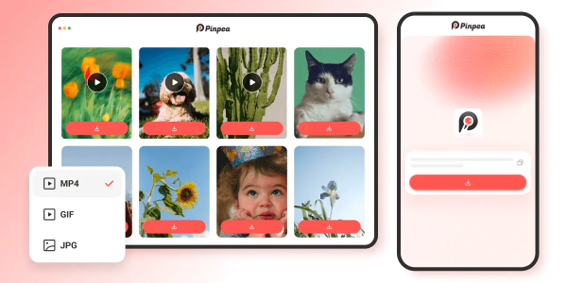
The important thing is not to assume that every downloader understands every Pinterest link.
5. The URL format is throwing the tool off
Two links can lead to the same Pinterest content without looking alike.
You may see a full pinterest.com URL, a pin.it short link, a regional Pinterest domain, or a much longer URL with parameters attached to the end.
Some downloaders deal with all of these without trouble. Others are pickier.
If Pinterest opens the link normally but the downloader rejects it, copy a fresh version from the Pinterest Share menu and try again.
Avoid cutting random pieces off the URL unless you know exactly what they do. Recopying the link takes a few seconds and is less likely to create another broken URL.
There is also a simple test: paste the exact same public link into another downloader. If it works there, you are probably looking at a compatibility problem rather than a bad Pin.
6. The downloader has fallen behind a Pinterest change
This is the situation where switching tools actually makes sense.
Pinterest can change how its pages or media are delivered. When that happens, a downloader that has not adapted yet may suddenly stop recognizing links that worked before.
Do not judge that from one failed Pin. Try two or three unrelated public Pins.
If only one fails, look at that Pin first. If none of them work, but they all still open normally on Pinterest, the downloader itself becomes a much stronger suspect.
You can test one of the same URLs in Pinpea. It works directly in the browser and supports common Pinterest URLs, including pin.it links.
If the link resolves there but not in the downloader you were using, there is probably nothing wrong with the URL. The first tool is simply having trouble reading it.
This is why active maintenance matters more for a downloader than it might seem. Pinterest changes; a downloader has to keep up.
7. The download worked, but the file is somewhere else
This one catches a lot of people because it looks exactly like a failed download.
You click Download and nothing obvious happens. No big confirmation screen. No new file in your photo gallery. But the browser may already have saved it.
iPhone
Safari usually saves files to Files > Downloads.
A video downloaded from the web does not always appear in Photos automatically. Open it in Files first, then use the Share menu if you want to save it to Photos.
Android
Start with the Downloads folder.
Depending on your phone and browser, images and videos may also appear in Gallery or Photos automatically.
Windows and Mac
Open the browser's download history or check the normal Downloads folder.
There is another useful clue here: if the downloader already showed you the correct video or image before you clicked Download, the Pinterest link was probably parsed successfully.
At that point, stop changing the URL and check where the browser put the file.
8. The file starts downloading but never finishes
Sometimes the link works, the preview works, and even the download starts. Then it stalls.
You might end up with:
a download stuck at 0%;
a file that stops halfway through;
a 0 KB file;
a download that disappears altogether.
That is a different problem from the downloader failing to recognize a Pin.
Try the file once more. If it still stops, switch network connections or use another browser.
Also check the obvious things: enough free storage, browser download permissions, and any extension or security setting that might interfere with downloads.
A useful comparison is to try another Pin in the same browser. If other files download normally, the problem may be limited to that particular media file.
If everything fails in one browser but works in another, look at the browser rather than Pinterest.
A faster way to diagnose the problem
If you do not want to work through every section above, use this order:
Open the Pin on Pinterest. Does the original content still work?
Copy the link again from Share > Copy link. This rules out a bad or unrelated URL.
Try a second public Pin. If that works, the first Pin is the problem.
Try the original public link in another maintained tool, such as the Pinpea Pinterest Downloader. If it works there, the first downloader is the problem.
If the correct preview already appeared, check your Downloads folder. The media may have been found successfully and only the final save step is confusing.
That sequence is usually faster than refreshing the same downloader over and over.
Why do I only get the Pinterest cover image?
If you pasted a video, carousel, or multi-page Pin and received only a JPG or thumbnail, the downloader probably found the page but did not extract all of the media attached to it.
This is common with tools built mainly for simple video Pins.
Try the same link in a downloader that explicitly supports that content type.
With carousels and multi-item Pins, also check whether the results page contains several individual files. There may not be one single "download everything" file.
Why is the downloaded Pinterest video silent?
Play the Pin on Pinterest first.
If the original video has no sound, the downloaded version will not suddenly gain an audio track.
If it does have sound on Pinterest but your downloaded MP4 is silent, retry the download or test the same URL with another tool. That will tell you whether the problem came from the source or from that particular download.
Why did I get a 0 KB file?
A 0 KB file generally means the file was created on your device but the actual data was never transferred successfully.
Delete it and try again.
If another Pin downloads normally, you are probably dealing with an issue specific to the first file.
If every download ends up at 0 KB, try a different browser or network connection before blaming the Pinterest URL.
Why does the link work on Pinterest but not in a downloader?
Usually for one of two reasons.
Either Pinterest is showing you content because you are logged in and have access to it, or the downloader does not understand that particular link or Pin type.
Test a fresh public Pin first. If that works, there is probably something unusual about the original content.
If several public links all fail in the same tool, test one of them somewhere else. That will tell you much more than repeatedly editing the URL.
Final thoughts
A failed Pinterest download does not automatically mean you need a new downloader.
Start with the Pin itself. Make sure it still exists, is publicly accessible, and that you copied the actual Pinterest link.
Then check whether the tool supports the type of content you are trying to save.
If several normal public Pins fail in one downloader, testing the same link in Pinpea is a quick way to separate a bad link from a tool problem.
And if you already saw the correct preview, check your Downloads folder before starting over.
The key is figuring out where the process failed. Once you know whether the problem happened at the link, parsing, or download stage, the fix is usually much simpler.
 Add as a preferred source on Google





 Portugal Handbook
 English
 Nederlands
 Deutsch
 Français
 Español
 Italiano
 Svenska
 Pусский
 中文
中文 Türkçe
 Português
 Czech
Czech Hungarian
 Polski
 عربي
عربي Suomi
Suomi עִברִית
 Português (Brasil)
Follow us on social media